React interview cheatsheet
import Table, { H1 } from "./blog/react-cheatsheet/components/table-of-contents-q"
I was super lucky to be selected to have a mock React interview with the wonderful Cassidoo. She’s a Principal Developer Experience Engineer over at Netlify.
The awesome people at Scrimba came up with the idea. Shoutout to Alex Booker for organizing everything and being so nice and reassuring!
To be honest, when I found out I was having the interview, I freaked out. I went into geek mode to study. Luckily, Alex wrote a great piece with the questions that might come up (or not … video coming up soon).
This is my cheatsheet. I took all the questions and answered them in my own words. You know... How you would on an interview. That way I could hit cmd + f and find that "cue card".
This comprehensive React interview guide covers everything from basic concepts to advanced patterns that frequently appear in technical interviews at companies like Meta, Google, Netflix, and other top tech firms.
Table of contents
React DOM
The real DOM can actually update the HTML. While the virtual DOM can't.
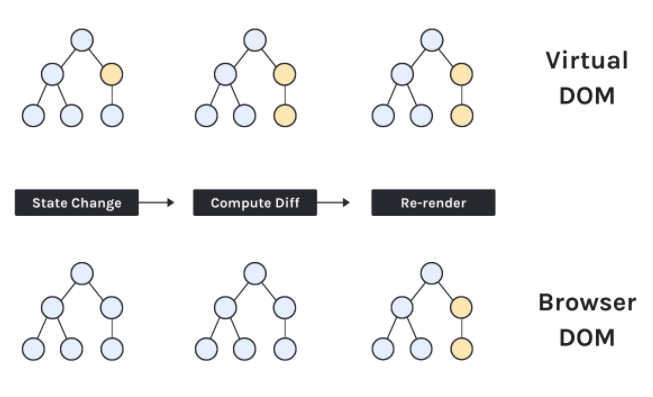
The real DOM creates a full re-paint when it gets updated. The virtual DOM acts as a copy of the actual DOM which listens for state updates and computes the diffs with the previous VDOM so that it can re-render only the nodes that have changed.
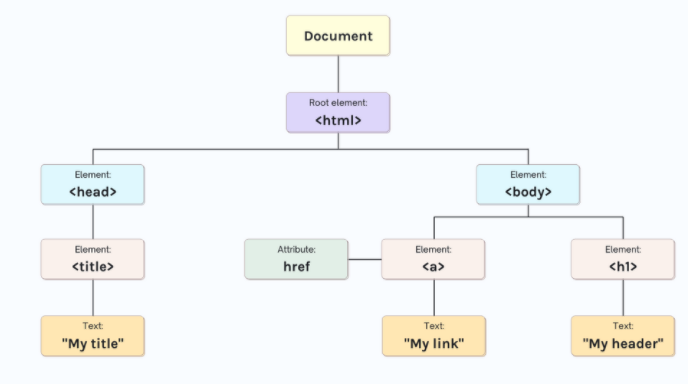
The real DOM is an object based representation of an HTML document + an interface for manipulating that object. The VDOM is a pattern that gets implemented differently by different technologies.
The real DOM gets synced by 'react-dom'
THE DOM
THE VIRTUAL DOM
No. It's a browser specific technology that works with styling. An example is a slider element, all the logic that runs behind it has already been worked out for you.
React limitations
Heavy dependencies
It's not a silver bullet. Some applications might benefit from using vanilla JS or a hybrid of both. Netflix uses vanilla JS for the front-page and react for the app after login.
JSX
JSX is an extension of JavaScript that allows you to use the React.createElement functions by using a syntax similar to html. It has to be transpiled by a preprocessor into regular JavaScript.
Yes, you can use the React API (React.createElement)
Props
Pass the value as a prop
By passing a callback function as a prop from the parent to the child.
Is when you pass a prop to a child element just so that this child can pass it onto its child.
No, props get passed but not modified.
State and lifecycle
Props are options to initialize a component.
State belongs and is managed within a component.
In a class component, state belongs to the class instance (this). The state is set when it's passed to the constructor function and accessed via this.state and modified via this.setState.
Functional components are managed by using the useState hook. This gets recalled each time the component renders and returns the state managed by React under the hood.
A component gets initialized, mounted, updated and unmounted. These methods live under the useEffect hook.
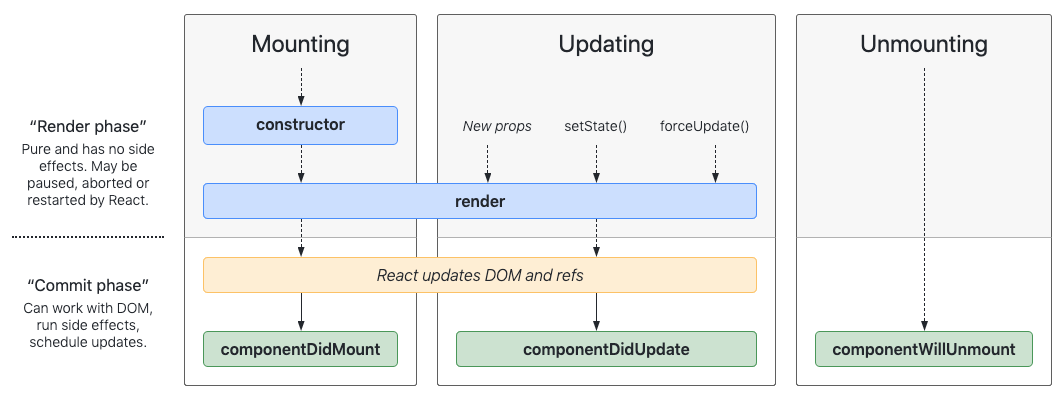
useEffect hook is equivalent to componentDidMount, componentDidUpdate, and componentWillUnmount
Effects
A function and a dependency array.
The function depends on the dependency array. If the array is empty, the function will only run when the component is mounted.
If the array has variables inside, they must be state variables. Every time any of these change, the function will run.
If no dependency array is passed, the function will get triggered on every state change.
The cleanup function executes before the component is unmounted to prevent memory leaks. It also ensures that if the component renders multiple times, the previous effect is cleaned up before executing the next.
Refs
They both persist values between renders but only state variables trigger re-renders. Refs are used to access DOM elements directly. They can also be used to persist values without triggering a re-render
Only when necessary. The React documentation describes refs as an "escape hatch". Accessing DOM elements is ofter a use case.
By using the useRef hook.
Context
The Context API allows us to access data without the need of passing explicit props. It can cause unnecessary re-renders if not used correctly as it's hard to trace.
Use it with infrequently updated data such as themes.
Other
It's a component that supports returning multiple children from a component's render method without having to wrap it inside a div
They're mostly interchangeable with some exceptions. If your codebase is mostly class based, stick with that.
Functional components have the advantage of using hooks. These are simpler to use, test and read.
A higher-order component (HOC) is a function that takes a component and returns a new, modified component.
It allows you to break out of the root element where the ReactDOM.render acts. It allows you to render children into a DOM node that exists outside the DOM hierarchy of the parent component. Use for tooltips, modals and dialogs that spill out.
Controlled components have child components (usually input, textarea or select) where the value is managed by a react state. Uncontrolled components' values can be accessed by react via refs, they can't be changed by react.
Performance Optimization
React.memo is a higher-order component that memoizes the result of a component. It prevents unnecessary re-renders when props haven't changed. Use it for components that render frequently with the same props.
const ExpensiveComponent = React.memo(({ data }) => {
  return <div>{data.map(item => <Item key={item.id} {...item} />)}</div>
})
useMemomemoizes a computed valueuseCallbackmemoizes a function reference
Both prevent unnecessary recalculations or re-creations, which can improve performance in child components.
- Use React.memo for components that receive stable props
- Implement code splitting with React.lazy and Suspense
- Use useMemo and useCallback to prevent expensive recalculations
- Optimize bundle size with tree shaking
- Use the React Profiler to identify performance bottlenecks
Error Handling
Error boundaries are React components that catch JavaScript errors anywhere in their child component tree. They log errors and display a fallback UI instead of crashing the entire application.
class ErrorBoundary extends React.Component {
  constructor(props) {
    super(props)
    this.state = { hasError: false }
  }

  static getDerivedStateFromError(error) {
    return { hasError: true }
  }

  componentDidCatch(error, errorInfo) {
    console.log('Error caught:', error, errorInfo)
  }

  render() {
    if (this.state.hasError) {
      return <h1>Something went wrong.</h1>
    }
    return this.props.children
  }
}
Advanced Hooks
useReducer is an alternative to useState for managing complex state logic. It's ideal when state updates depend on previous state or when you have multiple sub-values.
const initialState = { count: 0 }

function reducer(state, action) {
  switch (action.type) {
    case 'increment':
      return { count: state.count + 1 }
    case 'decrement':
      return { count: state.count - 1 }
    default:
      throw new Error()
  }
}

function Counter() {
  const [state, dispatch] = useReducer(reducer, initialState)
  return (
    <div>
      Count: {state.count}
      <button onClick={() => dispatch({ type: 'increment' })}>+</button>
    </div>
  )
}
useLayoutEffect runs synchronously after all DOM mutations but before the browser paints. useEffect runs asynchronously after paint. Use useLayoutEffect for DOM measurements or when you need to prevent visual flashing.
Testing React Components
Use React Testing Library for user-centric testing:
import { render, screen, fireEvent } from '@testing-library/react'
import Counter from './Counter'

test('increments counter', () => {
  render(<Counter />)
  const button = screen.getByRole('button', { name: /increment/i })
  fireEvent.click(button)
  expect(screen.getByText('1')).toBeInTheDocument()
})
React Patterns
A technique for sharing code between React components using a prop whose value is a function.
const MouseTracker = ({ render }) => {
  const [position, setPosition] = useState({ x: 0, y: 0 })

  useEffect(() => {
    const handleMouseMove = (e) => {
      setPosition({ x: e.clientX, y: e.clientY })
    }
    document.addEventListener('mousemove', handleMouseMove)
    return () => document.removeEventListener('mousemove', handleMouseMove)
  }, [])

  return render(position)
}

// Usage
<MouseTracker render={({ x, y }) => <p>Mouse at {x}, {y}</p>} />
A pattern where multiple components work together to form a complete UI. Think of HTML select and option elements.
const Tabs = ({ children, defaultTab }) => {
  const [activeTab, setActiveTab] = useState(defaultTab)
  return (
    <div>
      {React.Children.map(children, child =>
        React.cloneElement(child, { activeTab, setActiveTab })
      )}
    </div>
  )
}

Tabs.List = ({ children, activeTab, setActiveTab }) => (
  <div>{children}</div>
)

Tabs.Tab = ({ id, children, activeTab, setActiveTab }) => (
  <button
    onClick={() => setActiveTab(id)}
    className={activeTab === id ? 'active' : ''}
  >
    {children}
  </button>
)
Interview Success Tips
Technical Preparation:
- Practice building components from scratch without looking at documentation
- Understand when and why to use different hooks
- Be able to explain the virtual DOM reconciliation process
- Know the component lifecycle and how hooks relate to class methods
Communication Tips:
- Think out loud when solving coding problems
- Explain your architectural decisions
- Discuss trade-offs between different approaches
- Ask clarifying questions about requirements
Common Coding Challenges:
- Build a todo list with add/remove/edit functionality
- Implement a search/filter feature
- Create a custom hook for API calls
- Design a reusable modal component
Performance Questions:
- Explain when you'd use React.memo vs useMemo vs useCallback
- Describe how to prevent unnecessary re-renders
- Discuss code splitting strategies
- Know how to identify and fix performance bottlenecks
Real-World Application
State Management:
- Use local state for component-specific data
- Consider Context API for app-wide state (themes, auth)
- Use external libraries (Redux, Zustand) for complex state logic
- Keep state as close to where it's used as possible
Component Organization:
- Follow the single responsibility principle
- Create reusable, composable components
- Use TypeScript for better development experience
- Implement proper error boundaries
Performance in Production:
- Code splitting at route level
- Lazy loading for large components
- Optimize images and assets
- Use React Profiler to monitor performance
All these notes were based on this blog post. If you want to see Cassidoo explain in depth all of these answers, checkout her course on Scrimba.
If you want to learn way more about React and step up your game. Head on to Cassidoo's course on Building Reusable React
Ready to Master React? 🚀
This cheatsheet covers the essential React concepts that appear in 90% of frontend interviews. But remember, understanding concepts is just the beginning—practice building real applications to truly master React.
Next Steps for Your React Journey:
🔥 Build Projects: Create a portfolio of React applications that showcase different concepts 📚 Stay Updated: React evolves rapidly—follow the official React blog and RFC discussions 🧪 Practice Testing: Learn React Testing Library and Jest for robust, maintainable code ⚡ Performance: Dive deeper into React Profiler and performance optimization techniques 🎨 Advanced Patterns: Explore compound components, render props, and custom hooks
Common Interview Mistakes to Avoid:
- Don't memorize answers—understand the concepts deeply
- Always explain your reasoning and trade-offs
- Practice coding without autocomplete or documentation
- Be prepared to discuss real projects you've built with React
Remember: Great React developers don't just know the API—they understand when and why to use different patterns, can debug complex issues, and write maintainable code that scales.
Need personalized React interview prep? I've helped 200+ developers land frontend roles at companies like Meta, Google, and startups. From junior positions to senior React architect roles, I can help you prepare with mock interviews, code reviews, and targeted skill development.
Thanks again to Cassidy and Alex. It was a wonderful experience.
Good luck with your React interviews! 🎯
- mohammed 🧡